

CHKR
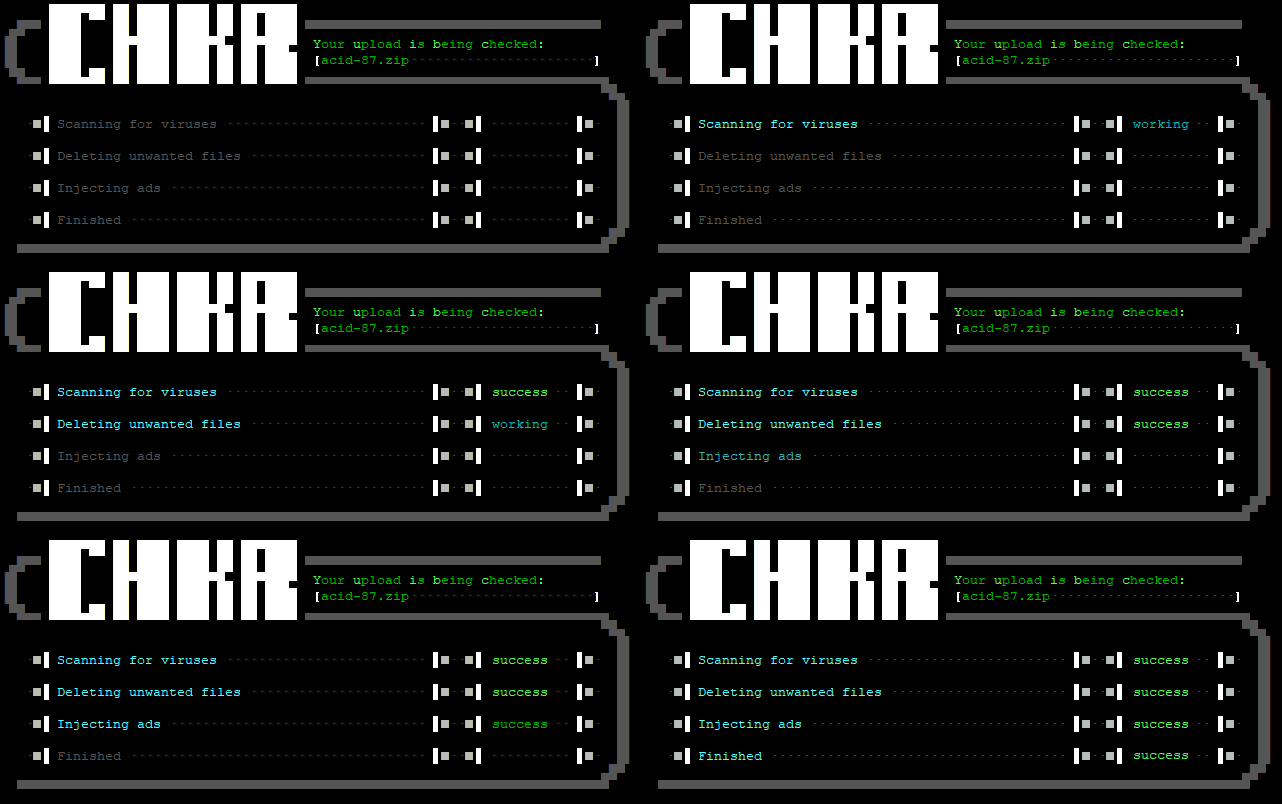
A simple upload checker written in python
Features
- Antivirus
Scan archives using clamav (daemon- and singlemode) - Remove files
Remove unwanted files from archives (e.G. those nasty ads from other sysops..) - Add Files
Add your own nasty ads... ;) - UTF-8 & CP437
Can output utf-8 and CP437 ansi (or nothing at all for cron) - Batch mode
Scan single or multiple files
Prequisites
- Python 3
-
Python libs:
- print_function
- subprocess.call
- time.sleep
- base64
- sys
- os
- argparse
- pyclamd (optional)
Optional
zip, rar, 7z, arj, tar, clamd
Installation
Download to your desired destination path. In this example, this will be
/opt/mystic/doors/chkr/
git clone https://gitlab.ambhost.net/scripts/chkr.git /opt/mystic/doors/chkr/
Alternative: Download zipfile:
wget https://gitlab.ambhost.net/scripts/chkr/-/archive/main/scripts_chkr-main.zip
unzip -d /opt/mystic/doors/ scripts_chkr-main.zip
mv /opt/mystic/doors/scripts_chkr-main /opt/mystic/doors/chkr
Set permissions (change username, group and path according to your system)
chown -R root:mystic /opt/mystic/doors/chkr/
chmod -R 770 /opt/mystic/doors/chkr/
find /opt/mystic/doors/chkr/ -type f -exech chmod 640 "{}" \;
Setup your BBS to actually use CHKR.
MysticBBS
- Start mystic configuration:
cd /opt/mystic
./mystic -cfg
- Go to:
(C)onfiguration->(F)ile Base Settings - Set
(T)est Uploadsto yes - Set the
C(o)mmand Lineto start CHKR:
/opt/mystic/doors/chkr/chkr.py "%3"
Other BBS'
While only been tested with MysticBBS so far, this is completely platform independant. You should be able to use it with any software and any os capable of starting python scripts and commit the full path and name of an uploaded file.
Configuration
Adjusting error threshold
On or around line 21 of chkr.py, you find the variable EXITONERROR.
The number defines what's rated as an error. Add numbers to combine events.
 1 - Problems deleting unwanted files
 2 - Problems adding own ads
 4 - Problem with clamav
 8 - Virus found

10 - Virus found OR problem adding own ads
14 - Virus found OR problem starting clamav OR problem adding own ads.
Graphics
The ansi graphics is actually included in the python script as a base64 encoded string. I've also included the original chkr.ans, so you can modify and customize it. When finished, encode it to base64, e.G. using the command base64 chkr.ans and replace the old string in the script (Line 52ff) with the new one, you've just created. String positions are hardcoded for now. This may change and you can change it yourself, easily. Just have a look at the sourcecode and search for calls to the function ansiHL and ansiXY. You'll find your way...
Usage
usage: chkr.py [-h] [-ns] [-nd] [-na] [-nc] [-u] [-q] filename [filename ...]
        -h  | --help     - display help
        -ns | --noscan   - don't scan for viruses
        -nd | --nodelete - don't delete unwanted files
        -na | --noadd    - don't add own ads
        -nc | --noclamd  - use clamscan instead of clamdscan
        -u  | --utf8     - convert CP437 output to UTF-8
        -q  | --quiet    - don't display status
        filename         - Filename of the archive to check
                          (repeat for more than one file)
Status codes
CHKR will return various status codes depending on the results of the check(s):
0 - Good
1 - Warning(s)
2 - Error(s)
License
Copyright 2018-20262026 Philipp Giebel
Permission is hereby granted, free of charge, to any person obtaining a copy of this software and associated documentation files (the “Software”), to deal in the Software without restriction, including without limitation the rights to use, copy, modify, merge, publish, distribute, sublicense, and/or sell copies of the Software, and to permit persons to whom the Software is furnished to do so, subject to the following conditions:
The above copyright notice and this permission notice shall be included in all copies or substantial portions of the Software.
THE SOFTWARE IS PROVIDED “AS IS”, WITHOUT WARRANTY OF ANY KIND, EXPRESS OR IMPLIED, INCLUDING BUT NOT LIMITED TO THE WARRANTIES OF MERCHANTABILITY, FITNESS FOR A PARTICULAR PURPOSE AND NONINFRINGEMENT. IN NO EVENT SHALL THE AUTHORS OR COPYRIGHT HOLDERS BE LIABLE FOR ANY CLAIM, DAMAGES OR OTHER LIABILITY, WHETHER IN AN ACTION OF CONTRACT, TORT OR OTHERWISE, ARISING FROM, OUT OF OR IN CONNECTION WITH THE SOFTWARE OR THE USE OR OTHER DEALINGS IN THE SOFTWARE.
Download
git clone https://gitlab.ambhost.net/scripts/chkr.git